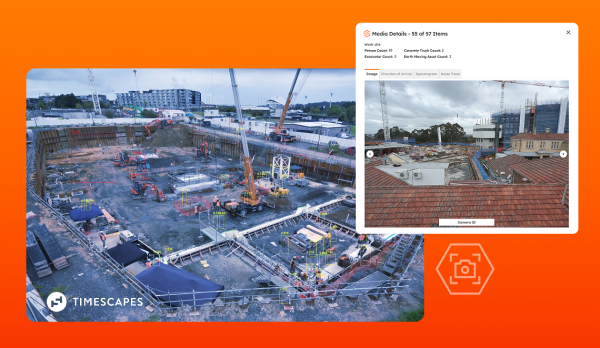
SiteHive Enviro Pro now shows Timescapes’ time-lapse imagery, so you get a richer, high-quality view of what happened on site – all in your SiteHive platform.
When an exceedance or complaint happens, you want to see what caused it and understand exactly what was happening on site at that moment. Was there an unusual site activity? Did the team stop work due to weather conditions? Was there an external issue?
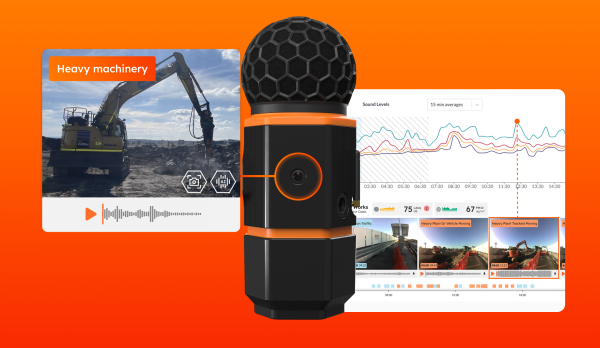
SiteHive already includes contextual images and audio files, taken whenever there’s an exceedance. These provide good quality pictures that let you see what’s happening at the monitoring point.
A new integration between SiteHive Enviro Pro and Timescapes enhances this further. It brings wide-angle, high-quality time-lapse imagery directly into your SiteHive monitoring platform, giving you more context to investigate — without switching tools.
Why and when is it useful?
Timescapes cameras capture wide-angle, high-quality images that give teams more context when something needs investigating or reviewing in depth. Until now, that meant opening a separate Timescapes platform to see them alongside your SiteHive data.
This integration brings that imagery straight into Enviro Pro, within the current media reel, so you can see the images alongside your environmental data. It brings two best-in-class tools together in one place.
Richer context on every exceedance
Timescapes cameras provide a wide angle and high image quality, making it easy to see what caused a noise, dust or weather event, and whether site activity or conditions played a role.
With Timescapes imagery available alongside your SiteHive data, teams get:
- Faster investigations — see what was happening on site at the moment of an exceedance or complaint, without switching platforms.
- Wider context — wide-angle, high-quality images show more of the site than a single device image alone.
- One system of record — Timescapes imagery sits in the same media reel as your SiteHive device images, for a complete picture.
Who is Timescapes and what does the product do?
Timescapes was founded in 2017 in Auckland, New Zealand, and now operates across Oceania and North America. They provide time-lapse imagery with smart layers on top. It’s built on:
- High-resolution, construction-grade cameras — built to withstand site conditions over the length of a project.
- An AI-powered analytics platform — turning raw time-lapse footage into a searchable, analysable record of what happened on site.
Together, this gives project teams a complete visual record of a project, which can be used to monitor construction for progress, productivity and safety.
It’s also great for resolving disputes and providing evidence, and can be used to engage and manage stakeholders with a single visual source of truth.


All your images in one place
Bringing that visual record into Enviro Pro means environmental data and construction imagery now live side by side, instead of in two separate systems.
How to use Timescapes within SiteHive Enviro Pro
Setting it up is simple.
If you are already using Timescapes, first go to Settings>Site Details within your SiteHive Enviro Pro software and add your Timescapes API key in the ‘Timescapes Integration’ box. You can then select your onsite Timescapes camera directly from your SiteHive monitoring point configuration.
Timescapes imagery will then appear in the media reel alongside your SiteHive device images, all within Enviro Pro.
Who is this integration useful for
This integration is built for:
- Environmental managers investigating the cause of an exceedance or complaint
- Site engineers who want a fuller picture of site conditions at a given moment
- Project managers tracking site conditions over the length of a project
- Safety managers checking to see if the site looks safe – for example that people are wearing hard hats, appropriate distances are being maintained for plant and equipment, etc.
Timescapes integration is available now
Timescapes integration is available now to SiteHive Enviro Pro users with a Timescapes camera on site. Contact us any time to find out more, or check the SiteHive Support Centre for setup steps.
If you’re not currently using SiteHive Enviro Pro, just contact us if you’d like more info or want to upgrade.
More contextual insights
For an overview of the Timescapes integration, as well as the many other contextual insights within SiteHive Enviro, watch our webinar: From contextual insights to action. Product expert Michael Darroch takes you through a wide range of contextual features available in SiteHive software using real examples to show how contextual insights save time, improve productivity and help you make more confident decisions.
FAQ
What you’ll find out:
- What is the integration between SiteHive and Timescapes
- How SiteHive + Timescapes can help better investigate site issues
- Where it’s useful
- How to start using it
Like more info?
Discover how SiteHive Enviro Pro software makes real-time environmental monitoring more effective.